In the previous chapter, we designed the company network of Fetched & Far.
We defined the sites, trust zones, addressing structure and the principle that internal systems are not automatically trusted.
What we have not yet designed is how those sites and people actually connect.
That is the topic of this chapter.
Two different problems are often treated as if they were the same:
- How do the Stuttgart and Zurich offices talk to each other?
- How do hybrid and remote employees reach internal systems?
They share security goals, but they have different operational characteristics.
An office link is always-on infrastructure.
A remote employee session is identity-driven, intermittent and tied to a person and a device.
Fetched & Far will therefore design them as related, but separate, access paths.
Connectivity Requirements
The design must support several of the requirements defined earlier in this series.
| Requirement | Connectivity implication |
|---|---|
| BR-02 / TR-02 | Employees need secure access from both offices and remote locations. |
| BR-03 / TR-03 | Access must remain authenticated, authorized and limited to what is required. |
| BR-05 / TR-05 | Additional offices and remote users must fit the same pattern. |
| BR-07 / TR-07 | A six-person IT team must be able to operate the solution day to day. |
These requirements still do not dictate a product.
They do, however, rule out designs that:
- Place every remote user onto a flat internal network
- Force all internet traffic through a single office
- Depend on undocumented, permanent exceptions
- Require constant manual care for every new employee or site
Two Problems, Two Designs
Site-to-site connectivity
Stuttgart and Zurich need a reliable encrypted path for internal traffic.
Typical examples include:
- Directory and identity replication
- Internal application access between sites
- Management and monitoring flows
- Backup or administrative traffic that is explicitly allowed
This path should feel like infrastructure.
It should come up with the offices, fail in a predictable way and not require every employee to "connect to VPN" before the building works.
Remote access
Remote and hybrid employees begin outside the corporate trust boundary.
Their access must answer different questions:
- Who is the user?
- Is the device managed and healthy enough?
- Which application or network path is actually required?
- Can the session be logged and revoked?
A username and password alone are not enough.
Neither is a permanent tunnel that makes a home laptop look like an office workstation on the internal LAN.
Site-to-Site Options
Fetched & Far considered several approaches for connecting the offices.
| Option | Strength | Weakness | Fit for Fetched & Far |
|---|---|---|---|
| Encrypted site-to-site VPN over the public internet | Low cost, widely understood, works with existing internet links | Depends on internet quality; needs careful routing and monitoring | Strong baseline |
| SD-WAN platform | Central policy, path selection, easier multi-site growth | More operational and commercial complexity | Possible later, not required now |
| Private or leased line | Predictable performance and isolation from the public internet | Higher cost for two nearby European offices | Not justified at current size |
| Hairpin all branch traffic through one hub | Simple mental model | Creates a single point of failure and unnecessary latency | Rejected |
Selected site-to-site design
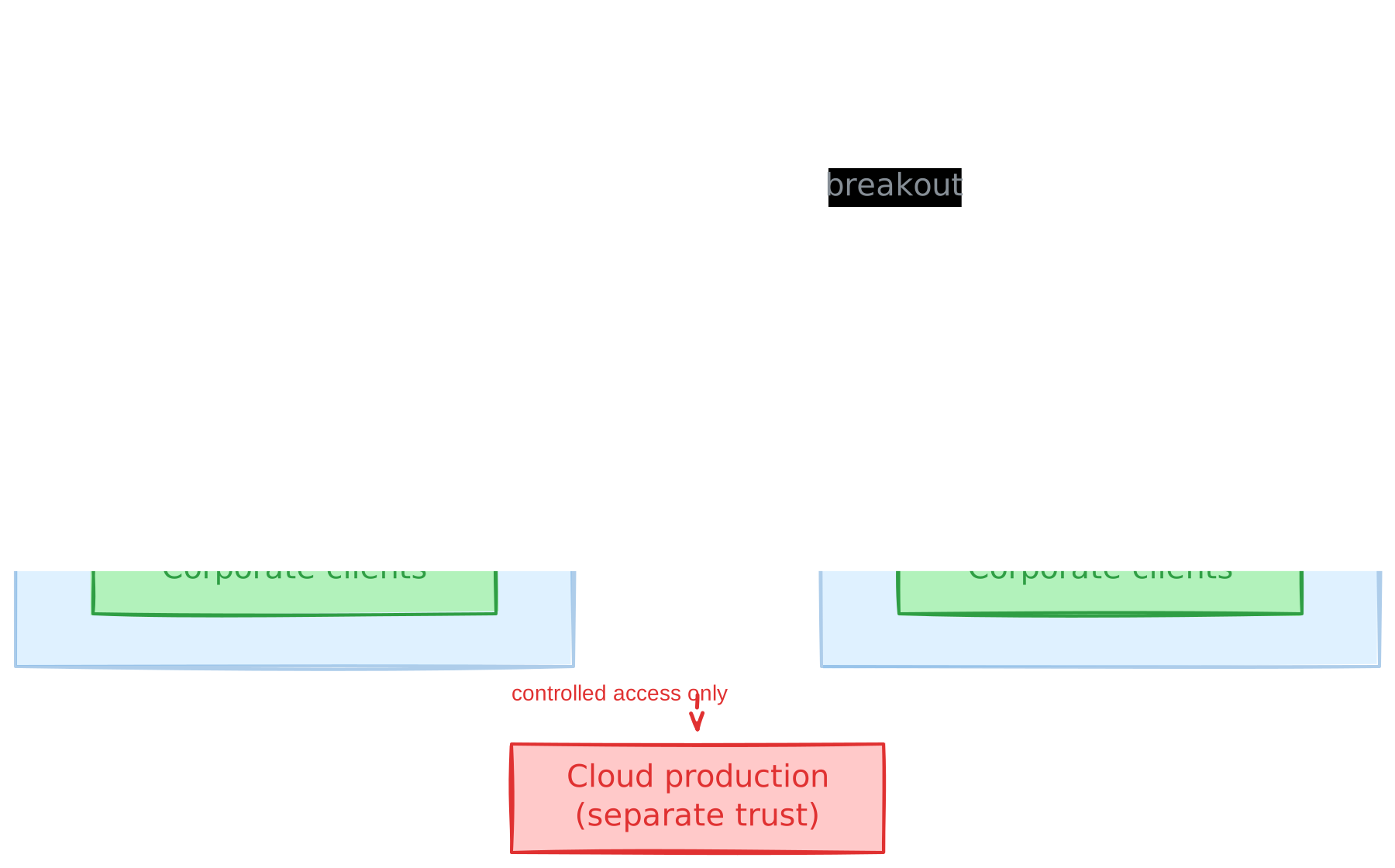
Fetched & Far will connect Stuttgart and Zurich with an encrypted site-to-site tunnel between the office firewalls, carried over each site's existing internet connection.
Important properties of that design:
- Each office keeps local internet breakout
- Internal traffic between sites is encrypted in transit
- The tunnel carries only the networks and flows that need to cross sites
- Cloud production remains a separate environment with controlled access, not an automatic extension of the office LAN
- A third office should be able to reuse the same pattern
This continues the decision from the network chapter:
Stuttgart must not depend on Zurich for ordinary internet access.
If the inter-site tunnel fails, each office should still reach the public internet and locally available services.
Internal applications hosted only in Zurich may become unavailable from Stuttgart until the path is restored. That is an accepted trade-off until individual services justify replication.
Remote Access Options
Remote access is where many small environments oversimplify.
The common default is:
Give everyone a full-tunnel VPN and treat the remote laptop as internal.
That is easy to explain.
It is also a poor match for least privilege, segmentation and a small IT team that later has to investigate a compromised endpoint.
| Option | What it provides | Main risk | Fit |
|---|---|---|---|
| Full-tunnel VPN for everyone | Simple "you're on the network" model | Over-broad access, hairpinned internet, weak alignment with zones | Rejected as the default |
| Split-tunnel VPN only | Less internet hairpinning | Still often grants broad network-level reach once connected | Useful in limited cases, not enough alone |
| Identity-aware application access | Per-app access based on identity and device | Does not cover every protocol or admin workflow | Preferred default for most employees |
| Hybrid model | App access by default, narrow network access only when justified | Two access patterns to document and operate | Selected |
Selected remote-access design
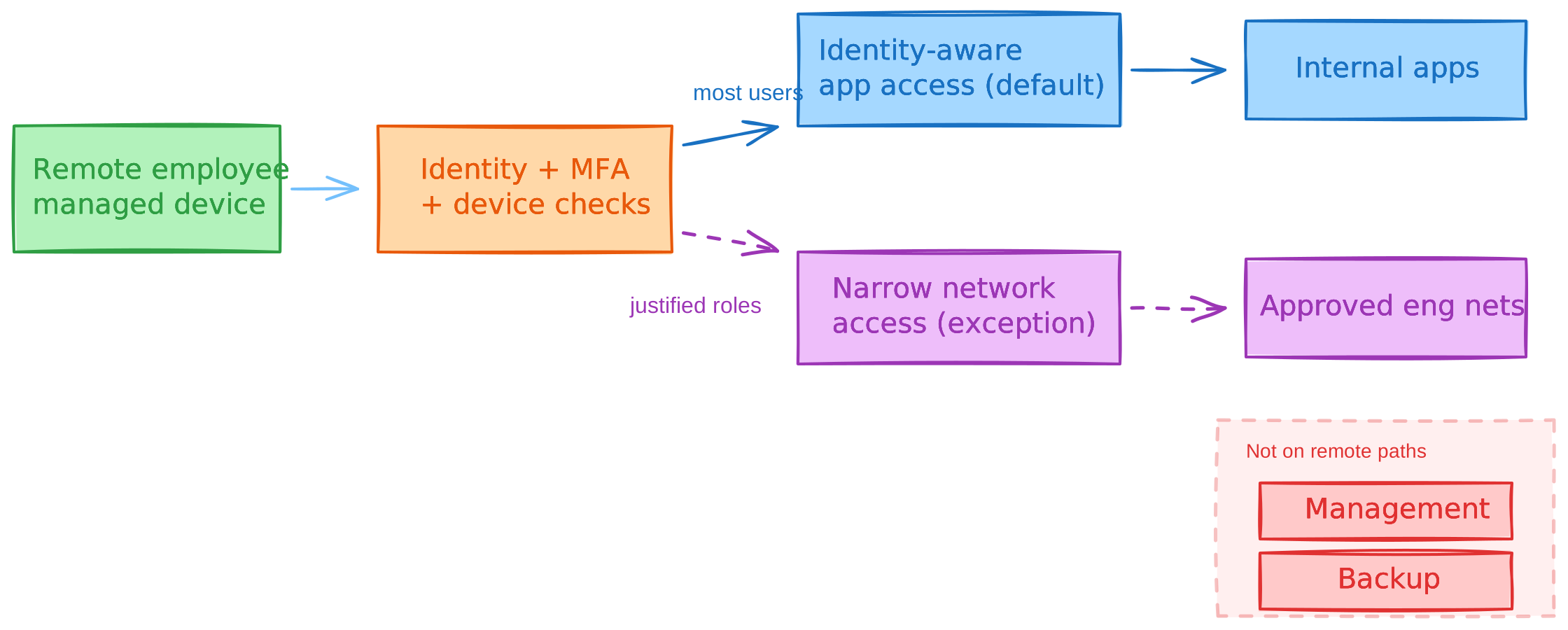
Fetched & Far will use a hybrid remote-access model.
Default path - identity-aware application access
Most employees should reach internal web applications through an identity-aware access layer.
Examples:
- Documentation portal
- Ticketing
- Internal dashboards
- Git web UI
- HR or finance web applications, where published internally
This path should require:
- An approved employee identity
- Multi-factor authentication
- A managed company device
- Authorization to the specific application
- Central logging of important access events
The user receives access to an application, not membership in the whole corporate network.
Exception path - narrow network-level access
Some work genuinely needs network-level connectivity.
Examples:
- Certain engineering workflows
- Administrative access from a privileged path
- Protocols that are not practical to publish application-by-application
That access remains available, but it is not the default for every employee.
When network-level remote access is granted, it must still respect the trust zones:
- No direct path from a normal remote session into the management zone
- No unrestricted reach into backup systems
- No broad lateral movement into the engineering lab
- Only the networks and ports required for the role
In product terms, this architecture can be implemented by more than one class of tool.
Overlay and zero-trust remote-access platforms including mesh-style products such as Tailscale or Twingate may fit well if they can be operated in line with these rules: identity integration, MFA, device requirements, least-privilege routes or app exposure, central logging and clear separation from unmanaged personal devices.
The product decision comes after the access model, not before it.
Who Needs Which Path
Different roles need different reachability.
| Role | Typical need | Default access path |
|---|---|---|
| Sales / Marketing | Browser-based internal tools and SaaS | Identity-aware application access |
| Finance / HR | Browser-based internal apps with stricter authorization | Identity-aware application access |
| Engineering | Internal apps, plus occasional lab or development network access | Apps by default; limited network access only where justified |
| IT administration | Infrastructure and management interfaces | Separate privileged path, never ordinary employee remote access |
This is intentional.
An account that can read the handbook should not, by default, be able to open hypervisor consoles or backup repositories.
What Remote Access Must Not Do
The remote-access design is complete only when its boundaries are explicit.
Remote access must not:
- Flatten the trust zones defined in the previous chapter
- Allow guest or personal devices onto internal networks
- Expose management interfaces to ordinary user sessions
- Become the silent bypass for firewall policy
- Depend on long-lived shared credentials
If a remote path would violate a zone boundary, the boundary wins.
The access request is redesigned, not the security model.
Failure Scenarios
Connectivity designs should be judged by how they fail.
Inter-site tunnel failure
- Each office keeps local internet access
- Local DHCP, DNS and identity availability continue as designed earlier
- Cross-site internal application traffic is impacted
- Remote users who only need identity-aware apps may still work if those apps and identity services remain reachable
Zurich outage
- Stuttgart continues basic local and internet operation
- Zurich-hosted internal applications are unavailable
- Remote access to Zurich-hosted systems fails with them
- This remains an accepted early-stage trade-off rather than a mandate to duplicate every service
Remote access control plane unavailable
- Employees may lose access to internal apps from outside the offices
- Office-local work should degrade as little as possible
- This is one reason office networks must not depend on the remote-access path for ordinary on-site operation
Compromised remote laptop
- MFA and device requirements raise the bar, but do not make compromise impossible
- Identity-aware app access limits blast radius compared with a full-tunnel VPN
- Network-level grants must be narrow enough that one endpoint does not become a bridge into management or backup
Design Trade-offs
| Decision | Benefit | Trade-off |
|---|---|---|
| Site-to-site tunnel over internet | Affordable encrypted office link | Depends on internet quality and monitoring |
| Local internet breakout at both sites | Removes unnecessary hub dependency | Two egress points to operate and secure |
| App-first remote access | Least privilege for most employees | Not every workflow fits neatly behind apps |
| Limited network-level remote access | Supports engineering and admin reality | Must be tightly scoped and reviewed |
| Architecture before product choice | Avoids tool-driven design | Delays the comfort of a brand-name decision |
| No full-tunnel default | Preserves zone model and reduces lateral movement | Slightly more design work up front |
This is not the most minimal design imaginable.
It is, however, much simpler than running a full enterprise SD-WAN fabric, duplicated data centers and unrestricted remote network access for every employee.
Architecture Decision Record
ADR-006 - Office and remote connectivity
- Status: Accepted for the current company size
- Context: Fetched & Far has two offices, hybrid employees, segmented internal zones and a small IT team.
- Decision:
- Connect offices with an encrypted site-to-site tunnel between site firewalls over the internet.
- Keep local internet breakout at each office.
- Prefer identity-aware application access for remote employees.
- Allow narrow network-level remote access only for justified roles and flows.
- Preserve trust-zone boundaries on every remote path.
- Consequences:
- Product selection must support identity, MFA, device signals, logging and least privilege.
- IT must document which roles receive network-level access and why.
- Inter-site dependency remains limited to traffic that truly needs to cross sites.
- Rejected alternatives:
- Full-tunnel VPN as the company-wide default
- Hairpinning all branch internet traffic through Zurich
- Private leased line as the initial interconnect
- Treating remote access and site-to-site connectivity as one identical mechanism
Looking Ahead
We now know how the offices connect and how remote employees should reach internal systems.
We have also established that most remote access is an identity problem before it is a routing problem.
That makes identity the next foundation to design in detail.
In the next chapter, we will define the identity architecture of Fetched & Far: the relationship between directory services and a modern identity provider, authentication flows, MFA, SSO, availability and recovery.
As before, those choices will follow the requirements and the access model not the other way around.